KUTORA GUIDE™
How to run every tool on the site · keep this open on the shop tablet
Staff sign-in
Jump to
Every page and who can see it
Customer pages — anyone on the internet
H HomeServices, memberships, hours, the opening-day signup form Public W Why Jackson Barber Co.Your shop's story, philosophy, and customer promise Public P PortfolioPhoto gallery of real cuts, filterable by type Public S KUTORA VISION™Face-shape scan that recommends a cut. Your most unusual feature. Public B KUTORA BOOK™Customer services, availability, and appointment requests PublicStaff pages — sign-in required
$ KUTORA PAYRing up cuts, take tips, cash or card, void mistakes Staff C Staff DashboardDay's appointments, walk-ins, block time, set hours Staff V KUTORA VISION™ in the chairPick who's in the chair, scan, and save the cut plan to their record Staff ★ ReviewsPublish or take down reviews, reply, set the Google review link Staff % KUTORA TAXPartnership bookkeeping: recorded revenue, expenses, sales tax, and accountant-ready summaries Owner onlyAccounts and access
| Can do | Customer | Staff | Owner |
|---|---|---|---|
| Book an appointment | Yes | Yes | Yes |
| Use the Point of Sale | No | Yes | Yes |
| See the day's bookings | Own only | All | All |
| See sales figures | No | Own sales only | Everyone's |
| See profit, expenses, tax | No | No | Yes |
| See the opening-day list | No | No | Yes |
| Look up a customer's notes | No | Yes | Yes |
Adding a barber
- Have them create a normal customer account on the website first.
- Open your shop's Team settings and invite them using their email address.
- Assign the Staff role. Use Owner only for someone who must control the entire business.
- Once the invitation is accepted, they can sign in to the tools enabled for this shop.
A day in the shop
Opening
- Open Staff Dashboard on the tablet and sign in.
- Check today's appointments. Anything marked pending hasn't been confirmed by the customer yet.
- Open KUTORA PAY in a second tab and leave it there all day.
During
- Walk-in? Staff Dashboard → + New Appointment / Walk-In.
- Taking a break? Staff Dashboard → + Block Off Time, so nobody books it.
- Finished a cut? Ring it up in the POS straight away, before the next client sits down.
Closing
- Check the POS Today strip: sales count, cash, card, tax owed, total.
- Count the drawer against the cash figure.
- Log any money you spent that day in KUTORA TAX → Log an Expense.
- Leave partner tax estimates and transfers to the owners and their tax professional.
KUTORA PAY
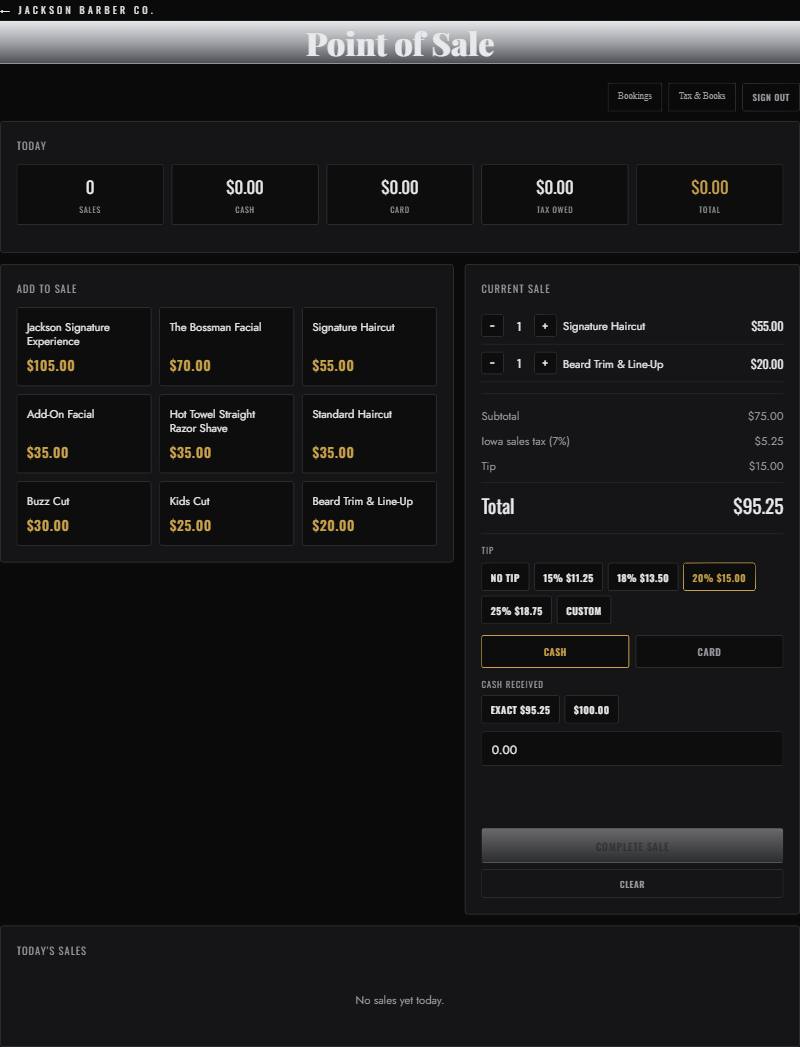
Ringing up a sale
- Tap the service buttons to add them. Tap again for a second of the same thing.
- Check the running total: subtotal, configured sales tax, tip, then the grand total.
- Choose a tip: 15%, 18%, 20%, 25%, Custom or No tip. Percentages are worked out on the pre-tax subtotal, the way a card terminal does it.
- Pick Cash or Card.
- For cash, tap a quick-cash button or type what they handed you — the change is calculated for you.
- Hit Complete Sale.
Fixing a mistake
Find the sale in Today's Sales and hit Void. Voided sales stay on the record with a line through them — they never vanish, which is what you want if anyone ever asks questions.
Your bookings on your phone's calendar
- On your phone, open Schedule and open Phone calendar.
- Tap Make my calendar link, then Add to Apple Calendar or Add to Google Calendar.
- New bookings, reschedules and cancellations then show up on their own. Apple Calendar checks every few minutes to an hour. Google Calendar sets its own timing and can take several hours.
Owners and managers can choose Whole shop instead of My bookings. Lost your phone? Tap Make a new link and the old one stops working. Events show the service and the client's first name and last initial only.
KUTORA VISION™ in the chair
- Tap Vision in the staff bar, or Vision on a booking in the schedule.
- Tap the client under Who's in the chair? The one closest to now is marked Now. For anyone else, type their name and, to save the result, their account email.
- Ask the client first, then tick their agreement and take the photos on the tablet. Photos are measured on the tablet and are not uploaded unless the client asks for AI previews.
- On the results, tap Save to their record. It lands in their client notes for every barber on the team, then tap Next client.
Saving needs a client account that has booked or visited this shop. Guests and walk-ins without an email can still be scanned. Use the barber card on the results screen for that cut. Front-desk accounts can't use Vision because they can't write to client records.
KUTORA SCHEDULE — bookings, walk-ins and hours

Moving around
The arrows step a day at a time; Today jumps back to now. Each card shows the time, who, what service, and a status badge.
| Badge | Means |
|---|---|
| Booked | Confirmed and expected |
| Pending | Slot held, customer hasn't confirmed by email yet |
| Completed | They came in and you finished |
| Cancelled / No show | Greyed out, kept for the record |
| Blocked | Time you closed off yourself |
Changing your hours
Hours for This Date changes one day only — useful for a dentist appointment or an early close. Weekly Hours changes the normal pattern from now on.
KUTORA TAX — owner only

Reading the top row
| Revenue | Everything you've taken, sales tax excluded |
| Expenses | Everything you've logged as spending |
| Recorded net | Bookkeeping subtotal before entity-specific tax adjustments |
| CPA review | Tax liability is intentionally not calculated here |
| Sales tax collected | Recorded tax collected for professional reconciliation |
A green Live badge in the corner means the page is watching for new sales. Ring one up on the POS and the figures move without a refresh.
Logging an expense
- Open Log an Expense.
- Date, amount, vendor.
- Pick the most consistent category. Your tax professional determines entity-specific return treatment and deductibility.
- Tick whether you kept the receipt. Keep it.
Entity-specific records
Select the correct structure in KUTORA SETUP™. The tax dashboard then shows the records checklist for a sole proprietor or single-member LLC, partnership or partnership LLC, S corporation, C corporation, or enterprise/custom structure.
Opening-day list — owner only
Everyone who signs up on the home page lands here, inside the Staff Dashboard. The number beside the heading is how many you have.
- Copy All Emails — comma separated, ready to paste into a bcc field.
- Download CSV — opens in Excel.
Filing calendar checklist
Deadlines depend on the shop's entity, elections, payroll, location, filing frequency, and extensions. KUTORA TAX does not calculate due dates yet. Confirm each item with the applicable professional or agency.
| What | When | Where |
|---|---|---|
| Sales and use tax | Confirm jurisdiction, filing frequency, due date, and amount | State/local revenue agency |
| Entity return | Confirm the return required for the selected legal and tax structure | Your tax professional |
| Owner or partner reporting | Confirm estimates, information returns, allocations, basis, and distributions | Your tax professional |
| Payroll filings | Confirm federal, state, and local deposit and return schedules | Payroll provider or tax professional |
| Business reports | Confirm annual or biennial entity reports and registered-agent requirements | Secretary of State or equivalent |
| Professional licences | Confirm worker and establishment renewals | Applicable licensing authority |
When something breaks
Can't sign in
- Tap Show next to the password box to check what you actually typed.
- Still stuck? Forgot your password? emails you a reset link.
- Nothing happens at all when you tap Sign In? Hard refresh with Ctrl+Shift+R — you're probably on a cached old copy of the page.
A page looks wrong after an update
Hard refresh first: Ctrl+Shift+R on Windows, Cmd+Shift+R on Mac. Browsers hold on to old files longer than you'd expect.
Prices are wrong on the POS
The POS reads prices from the database, not from the website. Changing the price on the homepage does not change what the register charges — both have to be updated.
Booking offers the wrong times
Staff Dashboard → Weekly Hours. That's the only thing the booking system reads.
Jackson Barber Co. · Huxley, Iowa · staff use only